Website widget · vanilla JS · one line
AI consultant widget
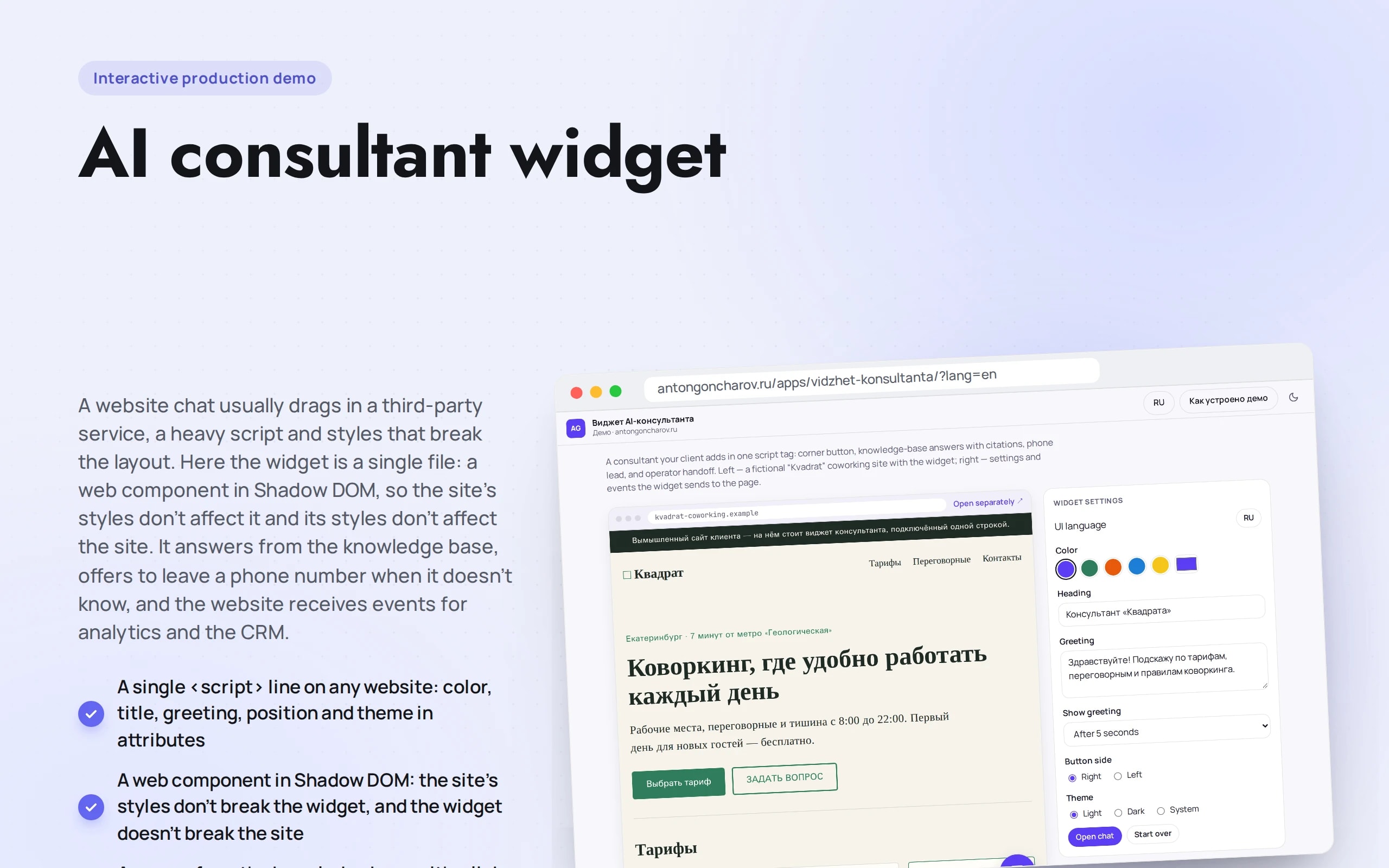
A website chat usually drags in a third-party service, a heavy script and styles that break the layout. Here the widget is a single file: a web component in Shadow DOM, so the site’s styles don’t affect it and its styles don’t affect the site. It answers from the knowledge base, offers to leave a phone number when it doesn’t know, and the website receives events for analytics and the CRM.
Scenario: Kvadrat Coworking — fictional, the same as the AI support bot’s: plans, meeting rooms, access, how to get there.
Open the demo
The widget is the button in the corner of the sample website, with settings next to it. On a phone the chat opens full screen.
The app runs in your browser: nothing is sent to a server.
What the demo shows
How to try it
Open the chat
The button in the corner of the sample website, or the greeting that appears after five seconds.
Ask a question
“How do I get there?” or “How do I book a tour?” — the answer comes with a link to the knowledge base section.
Leave a request
Ask something that isn’t in the base — the widget says so honestly and offers to leave a phone number or call an operator.
Customize it for your site
Change the color, greeting and position and copy the code. On the right you can see which events the website receives.
No paid neural networks
Answers are assembled from knowledge base fragments — with the same search as the support demo bot, without a language model. In a production project the fragments are passed to a model (GPT, Claude, YandexGPT or GigaChat), which answers in its own words, and the widget talks to it through your server, so the API key never reaches the website.
The demo runs without OpenAI, YandexGPT or GigaChat API keys. Wherever a production system calls a model, there’s a local stub with the same interface — so the demo is free, always available and never makes things up.
What a production project adds
- Language model answers from your knowledge base via your server, with sources
- The operator replies from Telegram or the CRM, receiving the whole conversation history
- Requests and questions the bot couldn’t answer go to the CRM and to a report for expanding the base
- Connecting to Tilda, WordPress, Bitrix or your own website with a single line
Stack
- All demos by stack:
- Vanilla JS
- JavaScript without frameworks
- Web Components
- Shadow DOM
- BM25
- JSDoc
- Vite
Based on
Books and university courses whose ideas are at work in this demo.
Book · Alexey Vasiliev
JavaScript Programming in Examples and Exercises
A web component in plain JavaScript inside Shadow DOM: open, question and lead events go to the site — to analytics goals or CRM.
Book · Bruce Lee
Bruce Lee: Artist of Life
A consultant in plain JavaScript without frameworks: the whole widget is 21 KB gzipped and goes on any site with one line. Simplicity is a sign of mastery.
Developer’s comment
Anton Goncharov
AI systems developer · Python
For business
- The assistant is added to any website with one line — no website rework and no third-party chat service.
- It answers with a link to the section, and on “I don’t know” it immediately offers to leave a phone number: a question becomes a lead.
- Widget events go to analytics and the CRM: you can see what people ask about and how many leads it brings.
For developers
- A web component in Shadow DOM without frameworks: the site’s styles don’t break the widget, and the widget doesn’t break the site. The whole bundle is about 21 KB gzipped, with the budget checked at build time.
- Search is the same BM25 as in the search sandbox and the support bot, a shared package.
- Accessibility: focus stays inside the window, Esc closes it, answers are announced to screen readers.
Tips
Tip 01
An embeddable script should be small and dependency-free: you don’t know what else is running on someone else’s site.
Tip 02
Keep the model API key only on your server: the widget talks to it, not to the model directly.
Want the same for your business?
Tell me about your task — I’ll tell you what from the demo fits, how long it will take and what I’ll need from you.
Other demos in this section
All demos- live

Web app · speech recognition · neural network in the browser
Voice request
A customer dictates a request by voice, and the manager gets a ready card: name, company, phone, budget, timeline, task and a score — hot lead or not. Speech is recognized by Whisper right in the browser.
- React
- TypeScript
- In-browser neural network
- live

Web app · call in the browser · speech recognition and synthesis
Voice delivery operator
A robot takes phone orders instead of the host: it listens, asks again, checks the address against delivery zones, totals the order and reads it back before confirming. The call runs right in the browser — a “Call” button, no phone number.
- React
- TypeScript
- In-browser neural network
- live

Web app · speech recognition · sales team quality control
Call speech analytics
A sales call becomes a transcript by role, a score against the script and a completed deal card: customer, contacts, interest, the quoted price, the next step and a task for the manager. Speech is recognized by Whisper right in the browser.
- React
- TypeScript
- In-browser neural network
- live

Web app · documents · DOCX and PDF
Proposal and contract generator
A manager fills in a deal form — buyer, products, discount, VAT — and the commercial proposal, supply contract and invoice are assembled on an A4 page before their eyes. The output is Word, PDF or JSON.
- React
- TypeScript
- live

Web app · B2B · proposal in PDF
Price configurator
A manager builds an order for all the windows in an apartment: type, size, sashes on a diagram, profile, glazing unit and color. Production rules are checked instantly, discounts and installments are calculated automatically, and a numbered proposal goes out as a PDF.
- React
- TypeScript
- live

Web app · finance · comparison
Mortgage calculator
Five bank programs on one screen: which suit the client and why the others don’t. A developer-subsidized rate, differentiated payments, early repayment, debt-to-income ratio and the tax deduction.
- React
- TypeScript
- live

Web app · estimate · PDF
Renovation estimate calculator
Room dimensions turn into floor, wall and ceiling areas, and those into work by stage. Labor and materials separately, the timeline based on crew output, a payment schedule and estimate versions for negotiating with the client.
- React
- TypeScript
- live

Web app · storefront · checkout · orders
React SPA catalog
A whole store in the browser: search with suggestions and keyboard layout correction, facets with live counters, links to any filter, favorites, a cart with a promo code and checkout with a delivery slot. Orders are visible in “My orders” with statuses and can be repeated or cancelled.
- React
- TypeScript
- live

Machine learning in Python · runs in the browser
Marketplace review analytics
Reviews from Wildberries, Ozon and Yandex Market via the seller API: scikit-learn models determine sentiment and what buyers write about, an alert fires in the first week of a complaint spike, new topics are discovered automatically, and replies go back through the marketplace API. The models train right in the browser.
- Python
- React
- TypeScript
- live

Website widget · vanilla JS · leads
Quiz lead form
A quiz instead of a long form: six questions with branching and a price estimate at the end. The manager gets a lead rated “hot / warm / cold” with its ad source, and the “Analytics” tab shows at which step people leave.
- Vanilla JS
- live

Python backend · webhooks → amoCRM and Bitrix24
Lead integration hub
Leads from the website, ads, calls, email and bots arrive at webhooks, are normalized, checked for duplicates, routed to managers and delivered to amoCRM and Bitrix24 — with retries when the CRM is unavailable.
- Python
- React
- TypeScript