Web app · meeting transcript · minutes · kanban
Meeting minutes → kanban tasks
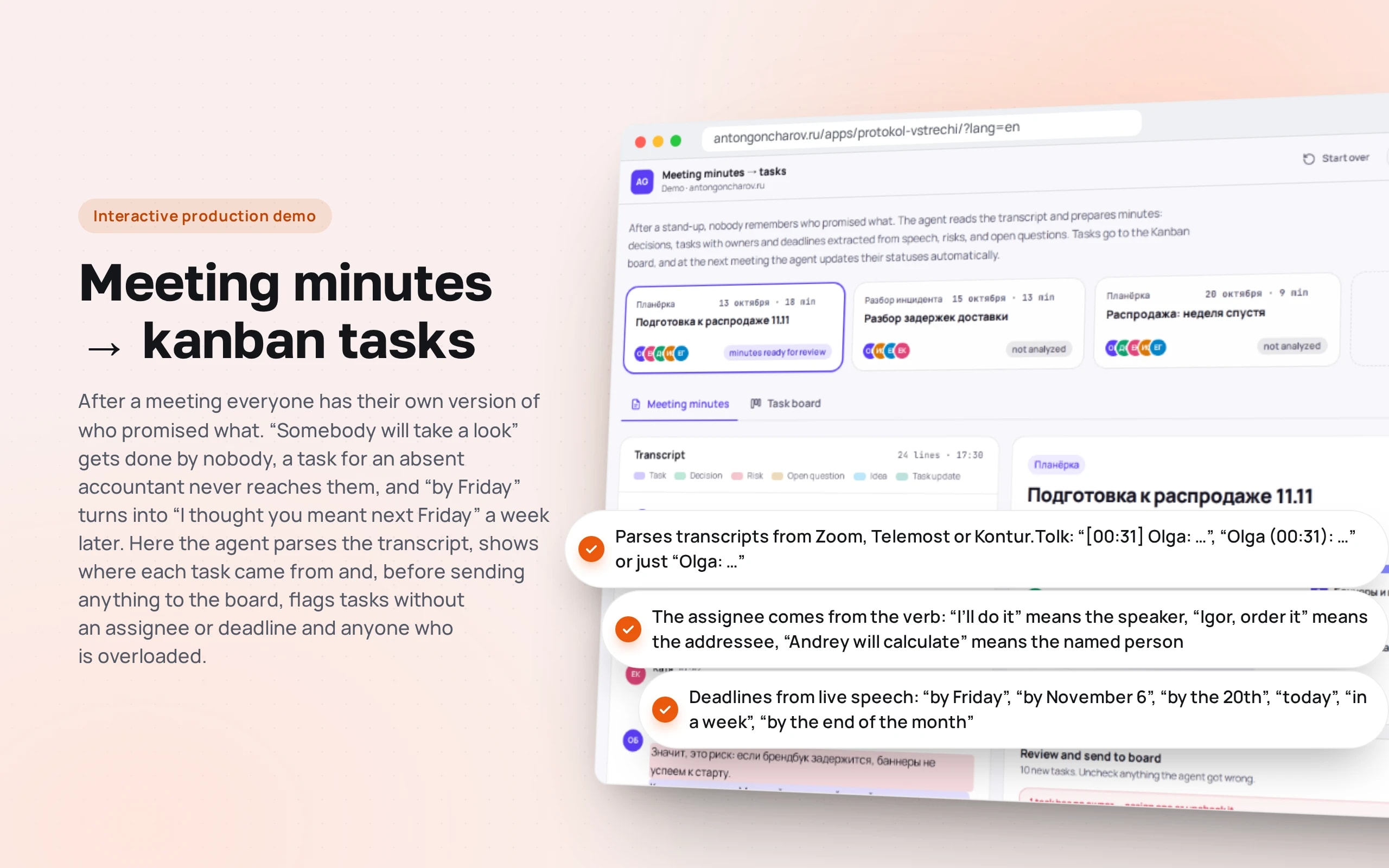
After a meeting everyone has their own version of who promised what. “Somebody will take a look” gets done by nobody, a task for an absent accountant never reaches them, and “by Friday” turns into “I thought you meant next Friday” a week later. Here the agent parses the transcript, shows where each task came from and, before sending anything to the board, flags tasks without an assignee or deadline and anyone who is overloaded.
Scenario: A tableware online store — fictional: three meetings of a seven-person team — sale preparation, a review of delivery delays and a stand-up a week later. You can paste your own transcript.
Open the demo
Best on a computer: the transcript and minutes are side by side. On a phone you switch between them with buttons.
The app runs in your browser: nothing is sent to a server.
What the demo shows
How to try it
Read the sale minutes
Ten tasks, four decisions, three risks and a postponed idea. Click the quote next to a task to open the line in the transcript.
Assign “somebody”
“Somebody check the stock” — a task without an assignee, so the minutes can’t be sent. Choose an assignee and press “Send to board”.
Open the delivery review
Andrey wasn’t at the meeting — the agent warns that the task must be handed over in person. Igor has three tasks in three days — overload.
Hold the stand-up a week later
The agent doesn’t create duplicates but updates the board: promo codes are done, load testing is in progress and moved to October 27. Untick anything you disagree with.
Work with the board
Drag a card to another column, open a task’s history, turn on “Overdue only” or export CSV.
Paste your own meeting
“New meeting” — an example or your own transcript. Send participants an email, download the minutes and a calendar invitation.
No paid neural networks
The minutes are built by rules: a table of verbs and their forms, marker words for decisions, risks and questions, deadline parsing and matching with tasks on the board. In a production project the lines are parsed by a language model, while dates, checks and board updates stay in code — the model doesn’t move tasks without confirmation.
The demo runs without OpenAI, YandexGPT or GigaChat API keys. Wherever a production system calls a model, there’s a local stub with the same interface — so the demo is free, always available and never makes things up.
What a production project adds
- Transcripts from Zoom, Telemost, Kontur.Tolk or a call recording via speech recognition with speaker labels
- A language model (GPT, Claude, YandexGPT or GigaChat) finds tasks, decisions and risks in any wording
- Tasks go to Bitrix24, Yandex Tracker, YouGile, Kaiten or Jira; board statuses are pulled in for the next meeting
- The minutes and email go to participants after confirmation, and the meeting goes into the shared calendar
- A log of edits to the minutes — used to tune the rules and the prompt
Stack
- All demos by stack:
- React
- TypeScript
- React 19
- TypeScript
- Zustand
- Vite
- Tailwind CSS
Based on
Books and university courses whose ideas are at work in this demo.
Book · Gleb Arkhangelsky, Olga Strelkova
Remote Work: A Crash Course in Working from Home
After a stand-up there are written minutes: decisions, tasks with an assignee and a deadline, risks and open questions.
Developer’s comment
Anton Goncharov
AI systems developer · Python
For business
- After a meeting everyone has the same minutes: who does what and by when — with a quote rather than from memory.
- Tasks without an assignee, without a deadline or assigned to absent people are caught before they go to the board and get lost.
- The next stand-up starts with an up-to-date board: statuses from the reports update themselves, with no manual copying.
For developers
- Parsing is a pure function of the transcript and the board: in tests the same function runs three meetings in a row and checks that the second doesn’t duplicate the first one’s tasks.
- The assignee is determined by the verb’s mood, not by keywords: “I’ll do it”, “order it” and “he will calculate” point to different people.
- Dates and people can’t be left to the model: “by Friday” is counted from the meeting day, and the assignee is checked against the attendee list.
Tips
Tip 01
Ask the host to say the conclusion aloud: “So, Igor, by the 20th” — parsing accuracy improves more than from any prompt.
Tip 02
Don’t let the agent close tasks without confirmation: status updates are checkboxes a human can untick.
Want the same for your business?
Tell me about your task — I’ll tell you what from the demo fits, how long it will take and what I’ll need from you.
Other demos in this section
All demos- live

Web app · agent diagram
AI agent builder
A support agent is assembled from blocks: intents, a knowledge base, API calls, checks and operator handover. Send a customer message and watch its path light up on the diagram step by step.
- React
- TypeScript
- live

Web app · question → SQL → chart · PostgreSQL in the browser
AI data analyst
A manager asks in plain words — “revenue by channel for Q3”, “which customers stopped ordering” — and gets SQL, a chart, a table and a conclusion. The sales database is real PostgreSQL running right in the browser.
- React
- TypeScript
- live

Web app · risks against a standard · Word with tracked changes
Contract review
A counterparty sent their own contract — the review compares it with the company’s standard, highlights risky clauses, explains why they’re dangerous and suggests wording. The output is a Word file with tracked changes and a disagreement protocol.
- React
- TypeScript
- live

Web app · tasks from chat · kanban · evening digest
AI agent in a team chat
People write in the team chat as usual — “Pete, fix the price list by Friday”. The agent creates a task on the kanban board, moves it through “On it” and “Done”, reschedules and reassigns tasks, reminds about overdue work in the morning and sends a digest in the evening.
- React
- TypeScript
- live

Web app · shared inbox · CRM · protection against bank detail fraud
AI inbox triage
The agent reads the sales team’s shared inbox: it understands what each email is, extracts fields, creates a deal, a ticket or a task in the CRM and drafts a reply. An invoice with new bank details or a phishing email is caught before anyone pays or clicks a link.
- React
- TypeScript
- live

Web app · marketplaces · moderation check · unit economics
Product listings for WB and Ozon
The agent turns a supplier’s text into two listings — for Wildberries and for Ozon: a title within the marketplace limit, a description with search keywords, attributes from the reference lists. Then it checks what listings usually fail moderation on and calculates what’s left from each sale.
- React
- TypeScript
- live

Web app · personal data · healthcare · analytics
Anonymizing data before it reaches a neural network
The agent finds full names in any grammatical case, phones, passports, SNILS numbers, cards, addresses and diagnoses in emails and transcripts, replaces them before sending to an external neural network, and restores its answer to the real data on your side. It anonymizes a patient table for analytics so that nobody can be identified.
- React
- TypeScript
- live

Web app · automation · amoCRM, 1C, Telegram
An n8n-style automation pipeline
Three working scenarios of a furniture factory on a canvas, as in n8n: website leads go to amoCRM and to managers by lead temperature, YooKassa payments go to 1C with retries and an error branch, and every morning there’s a digest for the director. Trigger an event and watch records flow from node to node; the workflow can be edited and exported to real n8n.
- React
- TypeScript
- live

Web app · multi-agent system · content
A team of AI agents for content
Six agents prepare a publication from a brief: the editor-in-chief plans, the researcher finds facts in the knowledge base, the writer writes, the fact-checker and editor send the draft back for revision, and the SMM agent adapts the text for Telegram, VK, a newsletter, a blog and a carousel. You see the agents’ entire conversation, every edit and what would have been published without checks.
- React
- TypeScript
- live

Web app · HR · scoring and chatbot
CV screening and an interviewer bot
Twenty CVs for three vacancies are analyzed in seconds: employment periods, experience, salary and city, match with the requirements and a quote from the CV for every “yes” or “no”. What’s missing from the CV is clarified by a bot: it asks only the missing questions, follows up on vague answers and books an interview. Gender, age and family are left out of the assessment.
- React
- TypeScript
- live

Web app · RAG · neural network in the browser
Search sandbox
How a support bot finds an answer in a knowledge base: documents are cut into fragments, search runs by keywords, by meaning or as a hybrid, and every fragment found shows why it ranks above the others.
- React
- TypeScript
- In-browser neural network
- live

Web app · metrics · CI thresholds
Bot quality evaluation
Before a new bot configuration is rolled out, it’s run against control questions. Here you can see how that works: hit@1, hit@3, the share of correct refusals, a comparison with production and a red banner if CI would block the release.
- React
- TypeScript
- In-browser neural network
- live

Web app · AI security · vanilla JS
Prompt injection defense trainer
Try to trick a support bot: coax out a secret promo code, extract the system prompt or get a refund without grounds. Six defense levels, direct attacks and attacks via emails, reviews and the knowledge base, and a check log based on the OWASP Top 10 for LLMs.
- Vanilla JS
- live

Web app · AI economics · vanilla JS
AI bot cost calculator
How much a bot will cost per month on GPT, Claude, YandexGPT, GigaChat or your own model on a rented GPU. Token-based calculation, all models compared on a chart, tips on paying less, and a real o200k tokenizer right in the browser.
- Vanilla JS