Web app · scenario · aiogram 3 code
Bot scenario builder
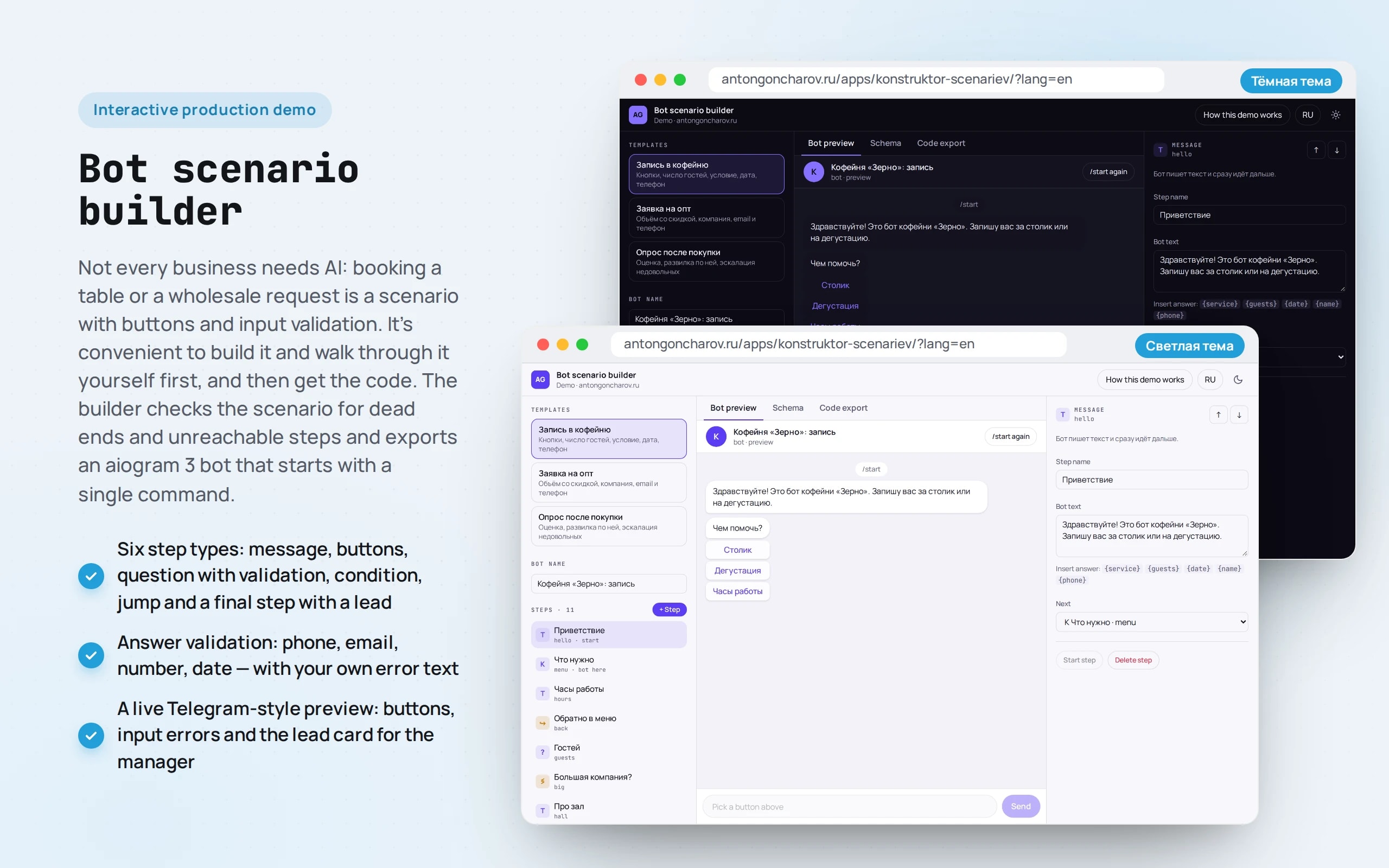
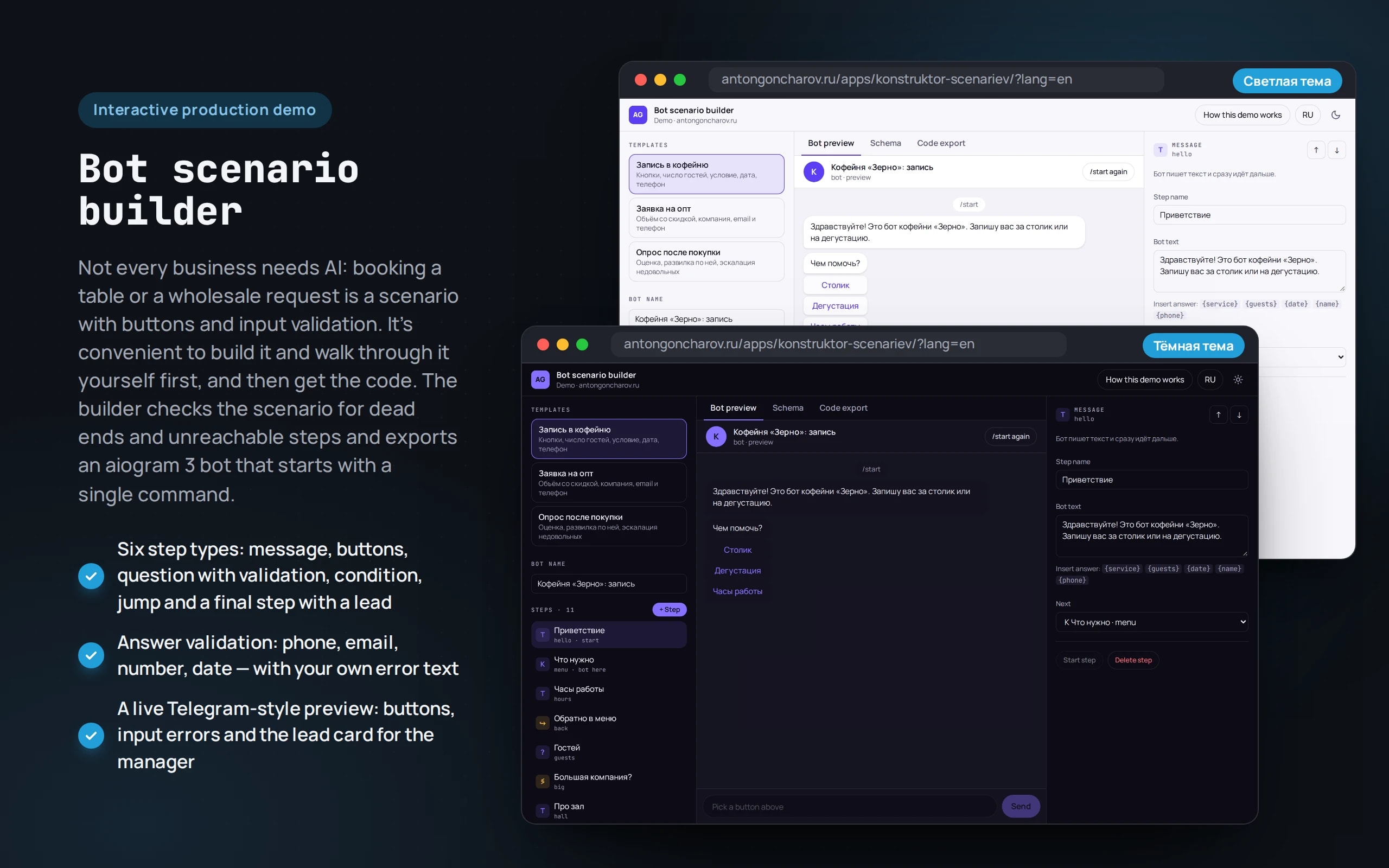
Not every business needs AI: booking a table or a wholesale request is a scenario with buttons and input validation. It’s convenient to build it and walk through it yourself first, and then get the code. The builder checks the scenario for dead ends and unreachable steps and exports an aiogram 3 bot that starts with a single command.
Scenario: Zerno coffee shop and roastery — fictional: table booking, a wholesale request, a post-purchase survey.
Open the demo
Best on a computer: steps, preview and properties are visible at once. On a phone they’re in tabs.
The app runs in your browser: nothing is sent to a server.
What the demo shows
How to try it
Choose a template
Coffee shop booking, a wholesale request or a post-purchase survey. The scenario starts in the preview immediately.
Walk through the scenario
Press “Table” and answer “eight” in words — the bot asks for digits. If there are more than 6 guests, a step about a private room appears.
Change a step
Select a step on the left and edit it on the right: text, buttons, validation, jump. Break a jump and the checks at the bottom show a dead end.
Take the code
The “Code export” tab: bot.py for aiogram 3 or the scenario JSON. The bot starts with a token from @BotFather and sends leads to the manager.
No paid neural networks
No neural network is needed here, and that’s a deliberate choice: in a scenario with buttons and input validation the bot behaves predictably, and leads arrive with the right fields. The generated code is checked in CI by compiling the Python for every template. Where a scenario hits free text, a production project adds a model — for example, to understand “there’ll be about eight of us”.
The demo runs without OpenAI, YandexGPT or GigaChat API keys. Wherever a production system calls a model, there’s a local stub with the same interface — so the demo is free, always available and never makes things up.
What a production project adds
- The same scenario in Telegram and Max, with leads going to amoCRM or Bitrix24
- State stored in Redis so the conversation survives a bot restart
- Reminders, payments and booking into a calendar or YCLIENTS
- Free text where buttons aren’t enough: a model extracts the fields, the scenario validates them
Stack
- All demos by stack:
- React
- TypeScript
- Python
- Telegram and Max
- React 19
- TypeScript
- React Flow
- zod
- Shiki
- Zustand
- Vite
- aiogram 3
Based on
Books and university courses whose ideas are at work in this demo.
Book · Fan Wenjie, Li Jianchao, Yan Xiaofan, Zhang Bin
Vibe Coding: Software Development in the Age of AI
The aiogram 3 bot code is generated from the diagram, but before export the scenario is checked for dead ends, unreachable steps and loops.
Book · Georgy Chelpanov
A Textbook of Logic
A bot scenario is checked like an argument: dead ends, unreachable steps, buttons that lead nowhere and loops are found before launch.
University course · CMC MSU
Discrete Structures
A bot scenario is a graph: dead ends, unreachable steps and cycles are found as graph reachability problems.
Developer’s comment
Anton Goncharov
AI systems developer · Python
For business
- You can build and walk through the scenario yourself before paying for development: you see where a customer will get confused.
- Phone, date and number validation means leads arrive with correct fields, and the manager doesn’t have to call back.
- Booking and simple requests don’t need a neural network: a button-based bot is cheaper, more predictable and doesn’t make mistakes.
For developers
- A scenario is data validated by a zod schema. From it come the React Flow diagram, the Telegram-style preview and the bot code.
- The generator outputs bot.py for aiogram 3, and in CI the generated code of every template is compiled with Python so that export doesn’t break unnoticed.
- Scenario checks look for dead ends, unreachable steps, buttons without a jump and loops.
Tips
Tip 01
Store a scenario as data, not code: it’s easier to validate, diff and open in an editor.
Tip 02
Test a code generator by its output: compiling the export catches more errors than string snapshots.
Want the same for your business?
Tell me about your task — I’ll tell you what from the demo fits, how long it will take and what I’ll need from you.
Other demos in this section
All demos- live

Telegram and Max · knowledge base search
AI support from a knowledge base
A first-line bot answers customers from the company knowledge base, shows the source of each answer, honestly says “I don’t know” and hands the conversation to an operator.
- Python
- Telegram and Max
- live

Telegram and Max · leads and CRM
Lead qualification
The bot takes a request in free-form text, pulls out the task, budget, timeline and contact, rates how “hot” the lead is and puts a card on the deal board.
- Python
- Telegram and Max
- live

Telegram Mini App · payment · statuses
A store in Telegram
A catalog as an app inside Telegram, a cart, test payment and order status notifications — from “packing” to “delivered”.
- Python
- Telegram and Max
- React
- live

Telegram and Max · booking, prepayment, reminders
Service booking in Telegram and Max
The bot books barbershop appointments: service, barber and free time via buttons or in a single phrase, prepayment, a reminder with “I’ll come” and “Reschedule” buttons, rescheduling, cancellation and the schedule as the administrator sees it.
- Python
- Telegram and Max
- live

Telegram and Max · points, QR at the till, broadcasts
Loyalty program in Telegram and Max
A bakery guest card right in the messenger: a QR code for the till that changes every minute, points and tiers, every sixth coffee free, points exchanged for coupons, bonuses for friends and segmented broadcasts with marketing consent.
- Python
- Telegram and Max