Python scraper · runs in the browser
Competitor price monitoring
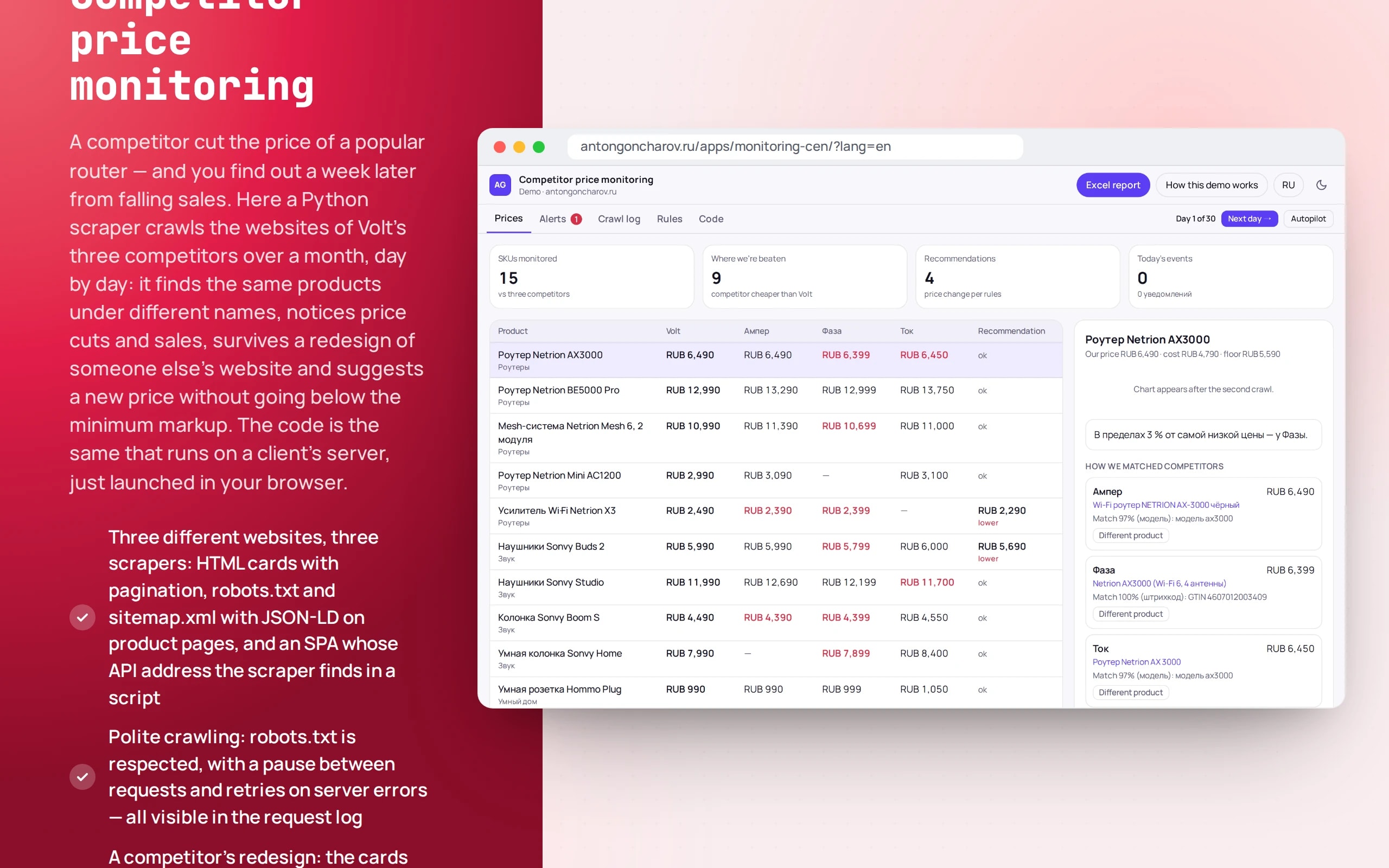
A competitor cut the price of a popular router — and you find out a week later from falling sales. Here a Python scraper crawls the websites of Volt’s three competitors over a month, day by day: it finds the same products under different names, notices price cuts and sales, survives a redesign of someone else’s website and suggests a new price without going below the minimum markup. The code is the same that runs on a client’s server, just launched in your browser.
Scenario: Volt — a fictional electronics store: 15 products — routers, headphones, smart home and chargers. The competitors Amper, Faza and Tok are fictional too; their websites are static pages for 30 days.
Open the demo
Python starts in the browser in a few seconds: the first time about 6.5 MB is downloaded, plus 8 MB for the Excel report in the background. Best on a computer: the price table and chart are wider.
The app runs in your browser: nothing is sent to a server.
What the demo shows
How to try it
Look at the first crawl
The app crawls the websites for the first day on its own. The “Crawl log” tab shows which pages the scraper requested and in what order, and the “Open site” link shows the competitor’s website itself.
Go to day six
In the “What to try” block — “Amper cuts the AX3000 router price by 12%”. A notification arrives, and the recommendation suggests ₽5,590 — press “Apply”.
Survive a redesign
Day 12: Amper changes its layout. The log shows a warning, but prices are still collected from the structured data.
Price war and the report
Day 18: Amper and Tok dump prices on headphones — the recommendation hits the minimum markup. Change it in the “Rules” tab and download the Excel file.
No paid neural networks
The competitors’ websites are fictional and hosted on this same server, one version for each of 30 days, but the scraper crawls them for real: Python 3.14 in the Pyodide WebAssembly build, BeautifulSoup, pandas and openpyxl. Products are matched by rules, without a neural network. The same package is tested with pytest on regular Python and runs on a server with a single command.
The demo runs without OpenAI, YandexGPT or GigaChat API keys. Wherever a production system calls a model, there’s a local stub with the same interface — so the demo is free, always available and never makes things up.
What a production project adds
- Scheduled crawling on a server, proxy rotation and retries, a Playwright browser for websites that don’t show prices without one
- Catalog and prices from 1C or MoySklad, with new prices pushed back to the store after a manager approves them
- Telegram notifications with buttons: accept the price, reject, open the product on the competitor’s site
- Marketplaces: Wildberries, Ozon and Yandex Market via their APIs
- History in PostgreSQL, a dashboard and a weekly Excel report by email
Stack
- All demos by stack:
- Python
- React
- TypeScript
- Python 3.14
- BeautifulSoup
- pandas
- openpyxl
- pytest
- Pyodide
- WebAssembly
- Web Worker
- Comlink
- React 19
- TypeScript
- Recharts
- Zustand
Based on
Books and university courses whose ideas are at work in this demo.
Book · D. M. Koltsov
Python by Example: Practice, Practice and Only Practice
A Python price parser with pytest tests that runs right in the browser via Pyodide: three sites, three parsers.
Book · Alexey Vasiliev
Python Programming in Examples and Exercises
The parser crawls three competitors’ sites in parallel with asyncio.
University course · CMC MSU
Python Development
A Python price parser with pytest tests, pandas and Excel export.
Developer’s comment
Anton Goncharov
AI systems developer · Python
For business
- A competitor’s price drop is visible the same day, not a week later through falling sales.
- The price recommendation respects the minimum markup — you won’t go negative in a price war.
- The Excel report is for those used to working in spreadsheets.
For developers
- The Python scraper (BeautifulSoup, pandas) runs in the browser in Pyodide; the same package passes pytest on regular Python and runs on a server.
- Three sites, three approaches: HTML with pagination, a sitemap with JSON-LD, and a SPA where the scraper finds the JSON API. After a redesign it switches to structured data.
- Matching with the catalog uses barcode, model and specs with an explanation; doubtful pairs go to a human for confirmation.
Tips
Tip 01
Look for a site’s JSON API and structured data before writing CSS selectors: they survive a redesign.
Tip 02
A scraper should fail loudly when a page changes, not silently return empty prices.
Want the same for your business?
Tell me about your task — I’ll tell you what from the demo fits, how long it will take and what I’ll need from you.
Other demos in this section
All demos- live

Web app · OCR · validating company details
Document recognition
Upload an invoice or a certificate of completion — a photo, scan or PDF. The app recognizes the text, extracts company details and table rows and validates them: tax ID and account checksums, the total and VAT.
- React
- TypeScript
- In-browser neural network
- live

Web app · conversations · deals · analytics
Operator panel
The workspace of an operator who receives difficult requests from a bot: a queue with a timer, a conversation summary, a reply draft, deals on a kanban board and analytics — on a live stream of customers.
- React
- TypeScript
- live

Web app · Recharts · RBAC · audit
SaaS dashboard
A SaaS revenue team’s workspace: MRR by plan, revenue movement, churn, customer health, CSV export for Excel and an activity log. All numbers are calculated from a single year of history — changing a plan in a customer card moves MRR on the charts immediately.
- React
- TypeScript
- live

Web app · Laravel · PostgreSQL
Warehouse system on Laravel
Warehouse accounting where stock is the sum of ledger entries, not a “qty--” field: orders with all-or-nothing reservation, picking by bin, receiving with CSV import, stocktaking and a ledger. A race between two real PHP processes in PostgreSQL shows why row locking is needed.
- PHP
- live

Web app · metrics · alerts
Bot monitoring
How a bot is watched in production: how many requests, how fast it answers, how often it fails or doesn’t know the answer. A request log with a trace of every answer and rules that message the on-call engineer in Telegram when something goes wrong.
- React
- TypeScript
- live

Web app · PWA · vanilla JS
Offline courier app
A courier’s working day: orders, a call to the customer, handover with a photo and signature. The app opens and works without a network, and changes go to dispatch when the connection returns. If the dispatcher changed the same order in the meantime, the courier chooses which version is right.
- Vanilla JS